

Most Reliable Smart Pet Feeders for Frequent Travelers
Table of Contents
- What Makes a Smart Pet Feeder Reliable When You Travel
- Smart Pet Feeder With Camera: What Monitoring Actually Tells You
- Wi-Fi Pet Feeder With Backup Battery: Surviving Power and Internet Failures
- Automatic Cat Feeder With App: Programming Schedules and Portions
- How to Monitor Pets While Travelling: Alerts, Checks, and Backup Plans
- Portion Accuracy, Food Capacity, and Hopper Design
- Total Cost of Ownership and the Limits of Unattended Feeding
- Conclusion
- Frequently Asked Questions
Last Updated: October 21, 2026
What Makes a Smart Pet Feeder Reliable When You Travel
The failure that ruins a trip rarely happens on day one.
At Bentley's Bark, we curate smart feeders with this scenario in mind, and "reliable" is not the same as "feature-rich." A camera is useless if the feeder forgets its schedule the moment your Wi-Fi blinks.
Below, we'll cover what to verify before you trust a feeder with an empty house: monitoring, power and connectivity failures, portion programming, and the backup plan every traveler needs.
Smart Pet Feeder With Camera: What Monitoring Actually Tells You
A smart pet feeder with camera monitoring tells you whether your pet approached the bowl and whether food is actually in it.
The camera's real value is confirmation, not diagnosis. The specs that matter are easy to overlook:
- Field of view: Does the camera see the bowl, or just the hopper lid? A bowl-level view is the only one worth having.
- Night vision: Cats eat at odd hours. Without infrared, the camera is blind exactly when you want it.
- Alert usefulness: A "meal dispensed" notification is noise. A "meal not dispensed" alert is the one that saves the trip.
- Two-way audio: Nice for reassuring a pet, but it drains battery and rarely changes an outcome.
Verifying That a Meal Was Actually Dispensed and Eaten
Most camera-equipped feeders confirm that the auger turned, not that kibble landed in the bowl. A jam, a bridged hopper, or an undersized portion can all produce a "meal dispensed" log entry with an empty bowl underneath.
The practical test is a two-part check you can run before you leave:
- Dispense a test portion while watching the live feed. Confirm you can see kibble fall into the bowl from the camera's mounted angle, not just hear the motor.
- Compare the bowl level before and after. If the camera can't distinguish a full bowl from an empty one at your pet's typical distance, the feed is decorative.
A useful pattern: schedule one meal per day at a time you can watch live, then use the remaining meals as unattended drops. That gives you one verified data point daily.
Alert Delays and Connectivity Failures
Camera feeds depend on your home upload speed and Wi-Fi stability. If your router drops while you're away, the app shows a frozen frame or nothing at all. That's not a feeder failure, but it feels like one from a hotel room.
Two timing issues matter more than most buyers realize:
- Notification latency. Some apps batch alerts or throttle push notifications to save battery. A missed-meal alert that arrives four hours late is nearly useless if your backup caregiver needed to act within one.
- Reconnect behavior. After a router reboot, a good feeder rejoins the network and resumes its stored schedule without intervention. A weak one requires a manual re-pair, which you cannot do remotely.
Test both before a long trip: unplug your router for ten minutes, then confirm the feeder reconnects on its own and a test alert reaches your phone within a minute or two.
Privacy and Account Security
A camera pointed at your pet is also a camera inside your home. Before buying, check three things:
- Local versus cloud storage. Feeds and clips stored only in the cloud mean your footage leaves the house. Some models support local storage on a memory card, which keeps recordings on-site.
- Account security. Use a unique password and enable two-factor authentication if the app offers it. Shared logins are the most common weak point in any connected device.
- Microphone behavior. Two-way audio means a live microphone in the room. Confirm whether the mic can be muted in the app and whether it stays muted after a power cycle.
Wi-Fi Pet Feeder With Backup Battery: Surviving Power and Internet Failures
A Wi-Fi pet feeder with backup battery keeps feeding through short outages, but only if the schedule is stored on the device, not in the cloud.
Here's how the failure modes actually play out:
| Failure | What happens with a good feeder | What happens with a weak one |
|---|---|---|
| Power outage | Battery backup runs the schedule | Feeder stops until power returns |
| Wi-Fi drops | Stored schedule keeps dispensing | Cloud schedule fails, no meals |
| Router reset | Reconnects and resumes | Loses time, misses meals |
| Low food | Low-food alert sent | Silent until the bowl is empty |
Before you travel, test the failure path yourself. Unplug the feeder for ten minutes and see whether it still dispenses on schedule, then turn off your router and check whether meals continue. If either test fails, the feeder isn't travel-ready.
Automatic Cat Feeder With App: Programming Schedules and Portions
An automatic cat feeder with app control is only as good as its portion accuracy. Program it once, then verify with a kitchen scale before you leave.
Set schedules around your cat's normal routine, not what's convenient in the app.
A practical pre-trip checklist:
- Weigh one portion on a scale and compare it to the app's setting
- Confirm the schedule matches your pet's usual mealtimes
- Check that the hopper holds enough for the full trip plus two days
- Test the low-food alert by letting the hopper run low
- Confirm the feeder keeps its schedule with Wi-Fi off
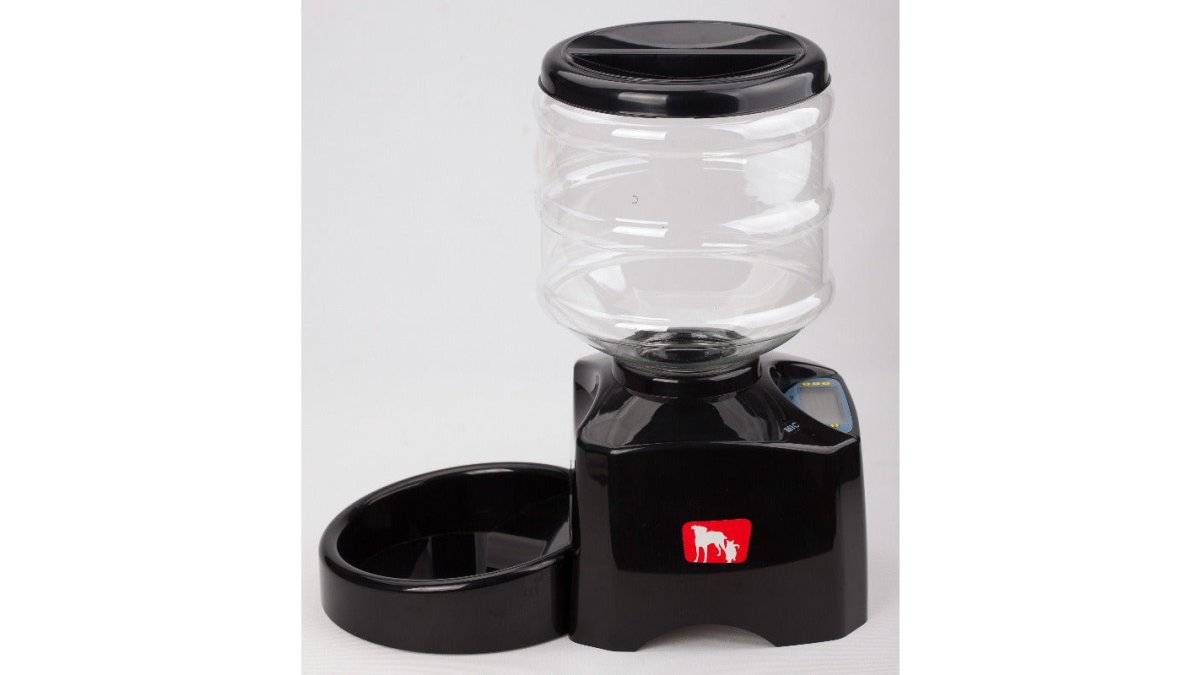
For dogs and cats alike, our 5.5L Programmable Pet Feeder lets you set feeding schedules and control portions from a simple interface, with a 5.5-litre hopper that suits longer trips.
5.5L Programmable Pet Feeder for Cats and Dogs →
How to Monitor Pets While Travelling: Alerts, Checks, and Backup Plans
Monitoring pets while travelling works best as a layered plan: device alerts, a daily visual check, and a human backup who can step in. No single layer is enough.
Start with alerts: turn on low-food and missed-meal notifications, and make sure they reach your phone, not an email you'll ignore.
The layer most people skip is the human one. Give a neighbour or pet sitter a key and a simple instruction: check the bowl once a day and text a photo.
A Failure-Planning Checklist for Travelers
Reliability gets proven in the failure cases, not the demo. Write a short plan for each of the following and share it with your backup person:
- Power loss: Confirm the feeder runs its stored schedule on battery backup, and note how many hours or days the batteries are rated for. Tell your backup person where spare batteries are kept.
- Wi-Fi loss: Verify the feeder keeps dispensing with the router off. Note that you will lose camera access and app alerts during the outage, so your backup person becomes the only confirmation layer.
- Jam or bridging: Leave a simple instruction for clearing the chute and hopper, and confirm your backup person can reach the feeder without moving furniture.
- App or cloud outage: If the manufacturer's service goes down, remote control and alerts may stop even though feeding continues. Know whether your feeder's schedule is stored on the device or in the cloud, this determines whether an app outage is an inconvenience or a missed meal.
- Missed-meal alert not received: Set a daily phone reminder to open the app and check the feeding log manually, so a silent notification failure doesn't go unnoticed for days.
- Human backup unavailable: Have a second contact who can step in if your primary sitter is sick or travelling.
What to Write Down and Leave Behind
A one-page note taped near the feeder removes guesswork. Include the feeder model, where the manual is, how to clear a jam, the backup person's phone number, your pet's normal portion and mealtimes, and the nearest emergency veterinary clinic.
Multi-Pet Households and Food Access
One feeder rarely serves two pets well. Food stealing, separate diets, and guarding behavior are the most common reasons a trip goes wrong even when the hardware works. With more than one animal, use separate feeders in separate rooms or rely on a sitter.
Portion Accuracy, Food Capacity, and Hopper Design
Portion accuracy and hopper design decide whether a feeder works for a full trip or just a weekend.
A 5.5-litre hopper holds a meaningful amount of dry food, but capacity only helps if the food flows.
Food freshness is the other half. A sealed hopper keeps kibble dry and palatable, while a loose lid lets humidity in and food goes stale.
Jam prevention comes down to three habits: keep kibble dry, don't overfill the hopper, and test the dispensing mechanism before every trip.
Total Cost of Ownership and the Limits of Unattended Feeding
Total cost of ownership for a smart feeder includes the unit, batteries, replacement parts, and the cost of a backup plan. The sticker price is the smallest part of the equation.
Battery backup only works if the batteries are fresh, so budget for replacements before long trips.
The limits of unattended feeding deserve honest treatment. No feeder can detect illness, manage a pet that stops eating, or handle a multi-pet household where one animal guards the bowl.
Conclusion
Travelling with a pet at home comes down to preparation: a feeder that runs offline, a battery backup you've actually tested, and a human who can check in. Get those three right and the smart features become a bonus rather than a crutch.
At Bentley's Bark, we hand-pick feeders that solve the real problem, not just the demo. Our 5.5L Programmable Pet Feeder offers scheduled feeding and portion control in a durable, straightforward design, and every order ships free. Get started with Bentley's Bark and travel with one less thing to worry about.
Frequently Asked Questions
Do smart pet feeders work if the Wi-Fi goes out?
It depends on the feeder. Many smart pet feeders store their feeding schedule locally, so scheduled meals still dispense if the connection drops. What stops working is remote control and camera monitoring through the app. Look for a Wi-Fi pet feeder with backup battery so the unit keeps dispensing during a power outage too. Before any trip, test the feeder with your router unplugged to confirm it still feeds on schedule.
Can an automatic feeder replace a pet sitter?
For short trips, a reliable smart pet feeder can cover meals and let you check in visually. It cannot refill a jammed hopper, clean a water bowl, scoop a litter box, or handle a medical problem. For trips longer than two or three days, arrange at least one in-person visit, and keep a neighbor or sitter on call in case a missed-meal alert fires.
What features make a smart pet feeder reliable during travel?
Priority features are battery backup, a schedule stored on the device rather than only in the cloud, low-food and missed-meal alerts, and a hopper that resists jams with your pet's kibble size. Portion accuracy matters too, since inconsistent dispensing throws off feeding routines. Test all of these before you leave, not the day you fly out.
How do I choose a smart feeder for a cat or dog?
Start with kibble size and hopper design, since small kibble can jam some dispensers. Check portion accuracy and the smallest portion the feeder can dispense. For multi-pet homes, consider whether one feeder gives both pets food access or whether you need separate units. Confirm battery backup, alert quality, and warranty terms before buying, and read the return policy in case it does not suit your pet.